
ViewerPdf: A Fully Client-Side PDF Viewer Widget for Mendix Web Applications
Introduction
PDFs are everywhere in business applications — contracts, invoices, certificates, technical manuals, purchase orders, compliance documents. Almost every enterprise Mendix app eventually needs a way to show a PDF to the user without forcing them to download it or leave the app.
The default options are limited. Embedding a PDF in an <iframe> hands control over to the browser's built-in viewer, which behaves differently across browsers, can break under strict Content Security Policy (CSP) rules, and offers no way to customize the experience. Server-side rendering approaches add latency, infrastructure cost, and another moving part that can fail.
This is where ViewerPdf comes in.
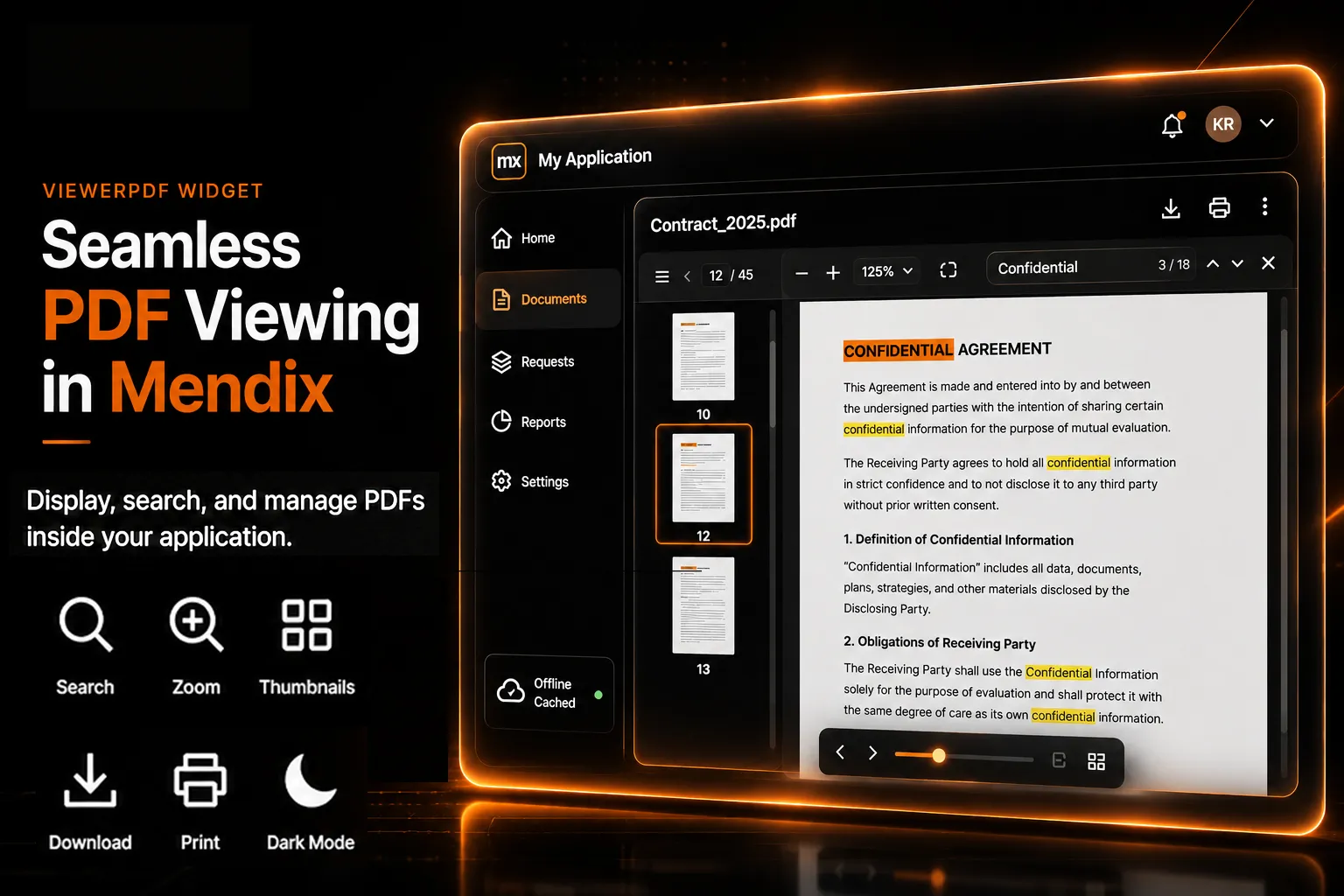
ViewerPdf is a custom Mendix pluggable widget that renders PDF documents entirely inside the browser, with no external calls to a PDF service, no iframe, and no server-side conversion step.
The widget supports:
-
Multiple input formats — base64, data URLs, or HTTPS links
-
Thumbnail-based page navigation
-
Full-text search with highlighted matches
-
Zoom, fit-to-width, and fit-to-page controls
-
Page rotation
-
Download and print
-
Drag-and-drop PDF upload
-
Copy-all-text to clipboard
-
Dark mode
-
Offline caching with IndexedDB
In this blog, we will look at what ViewerPdf does, how it is configured in Studio Pro, and where it fits in real Mendix applications.
What Is Client-Side PDF Rendering?
Client-side PDF rendering means the entire PDF — parsing, layout, and drawing — happens in the user's browser using JavaScript, rather than relying on a browser plugin, a native OS viewer, or a server that converts the PDF to images.
Each page of the document is drawn onto an HTML canvas element. Because the rendering logic lives inside the application itself, the widget has full control over how the document looks and behaves: it can highlight search matches, redraw a page at a different zoom level, rotate it, or extract its text — all without a single network round trip.
This approach is ideal for:
-
Applications with strict CSP or offline-first requirements
-
Enterprise portals where documents must remain inside the app's security boundary
-
Field-service and mobile-data-constrained environments
-
Any scenario where a consistent viewing experience matters more than relying on the end user's browser settings
The result is a predictable, self-contained viewing experience that looks and behaves the same for every user, on every browser.
What Is the ViewerPdf Widget?
ViewerPdf is a custom Mendix Web pluggable widget that displays a PDF document inline on a page, bound to a string attribute or expression that resolves to the PDF content.
It is built on top of PDF.js, Mozilla's open-source PDF rendering engine. Unlike most widgets that load such libraries from a CDN, ViewerPdf bundles PDF.js — including its web worker — directly into the widget at build time. This means the widget makes zero external network requests, works offline from the very first page load, and remains fully compatible with strict Mendix Content Security Policy settings.
Widget Identity
| Widget Name | Viewer Pdf |
| Widget ID | mxtechies.ViewerPdf |
| Package Name | ViewerPdf |
| Version | 1.0.0 |
| Platform | Mendix Web |
| Offline Capable | Yes |
| Entity Context Required | Yes — requires a data view/context containing the attribute or expression that resolves to the PDF |
| License | Apache-2.0 |
Note: ViewerPdf is built for Mendix Web pages. It is not designed for Mendix Native Mobile applications.
Why Use ViewerPdf in Mendix Web Applications?
Without a dedicated viewer widget, displaying PDFs in Mendix usually means one of the following:
-
Opening the PDF in a new browser tab, losing the in-app experience
-
Embedding it in an
<iframe>, with inconsistent behavior across browsers and CSP issues -
Converting it to images on the server, adding cost, latency, and complexity
-
Relying on third-party CDNs for a PDF rendering library, which may be blocked by network or security policies
ViewerPdf solves these problems by rendering the document directly in the page, using a bundled rendering engine that needs nothing from outside the app. Developers get a consistent toolbar with search, zoom, rotate, download, and print — and end users get a fast, native-feeling document viewer without ever leaving the Mendix app.
Key Features of the ViewerPdf Widget
Flexible PDF Input
ViewerPdf accepts the PDF String property in three formats:
-
Raw base64-encoded PDF content
-
A
data:application/pdf;base64,...data URL -
A standard
https://link to a PDF file
This means the widget can be bound directly to a Mendix file/document attribute converted to base64, a generated expression, or a simple URL — without any pre-processing on the Mendix side.
Smooth Performance with Lazy Page Rendering
Large PDFs with dozens or hundreds of pages can be slow to render if every page is drawn at once. ViewerPdf avoids this by only rendering the pages currently visible on screen, plus a small buffer of neighboring pages. Zoom changes are debounced and scroll position updates are batched, so even large documents scroll smoothly without freezing the browser.
Thumbnail Sidebar Navigation
An optional thumbnail panel on the left-hand side gives users a quick visual overview of the document and lets them jump directly to any page — useful for long contracts, manuals, or reports with many sections.
Full-Text Search with Highlighting
Users can search for any word or phrase within the document. Matches are highlighted directly on the rendered page, making it easy to locate specific clauses, values, or references inside long documents.
Zoom and Fit Controls
ViewerPdf includes zoom in/out controls, an always-available Fit to Width option, and an optional Fit to Page mode — giving users flexibility whether they're reading dense text or reviewing a full-page diagram.
Page Rotation
Pages can be rotated 90° at a time, which is particularly useful for scanned documents or pages that were saved in the wrong orientation.
Download and Print
Optional toolbar buttons let users download or print the document directly. The download file name is configurable through the Download File Name property, so generated documents can be saved with meaningful, business-relevant names.
Import (Upload) with Drag-and-Drop
When enabled, users can load a PDF from their own device — either by browsing for a file or simply dragging it onto the viewer. This is useful for scenarios where the document doesn't yet exist in Mendix and the user needs to preview it before uploading it formally.
Copy All Text
A single action copies the entire extracted text of the document to the clipboard — handy for pasting content from a PDF into a form, email, or another system without retyping it.
Dark Mode
ViewerPdf includes a built-in dark theme, so the viewer can match the rest of a dark-themed application without looking out of place.
Offline Caching
PDFs loaded from a URL are cached in the browser's IndexedDB storage. The toolbar shows "Offline" or "Cached" badges depending on connectivity and cache status, so previously viewed documents remain accessible even without an active network connection.
CSP-Safe and Offline-First by Design
Because PDF.js and its worker script are bundled inline at build time, ViewerPdf doesn't load any external scripts or rely on blob: URLs for its core engine. This makes it suitable for applications running under strict Content Security Policy configurations, including air-gapped or highly regulated environments.
Multiple Instances on a Page
PDF.js is loaded once per page and shared across all ViewerPdf instances, so placing multiple viewers on the same page — for example, side-by-side document comparison — doesn't multiply the loading cost.
ViewerPdf Widget Properties
The widget exposes the following configurable properties in Studio Pro:
Data Source
-
PDF String (
pdfUrl) -
Download File Name (
fileName)
Appearance
-
Height
-
Dark Mode
Behavior (all optional, off by default)
-
Show Thumbnail Sidebar
-
Enable Search
-
Enable Download
-
Enable Print
-
Enable Import (Upload)
-
Enable Copy All Text
-
Enable Rotate
-
Enable Fit to Page
The most important property is PDF String — this is the only required input. Everything else is an optional toggle that shapes the toolbar and viewing experience.
Common Use Cases of the ViewerPdf Widget
Contract and Document Review Portals
Legal, procurement, and vendor-management teams often need to review contracts, NDAs, and agreements without leaving the application. ViewerPdf lets reviewers open a document, search for specific clauses, zoom into fine print, and download a copy for their records — all from within the Mendix portal.
Compliance Certificate and Technical Manual Library
Field-service and asset-management applications often store equipment manuals, safety datasheets, and compliance certificates that engineers need to access on-site — sometimes with unreliable connectivity. Because ViewerPdf caches URL-based PDFs in IndexedDB, a document opened once back at the office remains viewable later in the field, even if the connection drops.
Vendor Invoice and Purchase Order Viewing
In procurement or finance workflows, users frequently need to cross-check an invoice or purchase order against data already captured in the system. ViewerPdf can render the original PDF alongside the corresponding Mendix record, letting users visually verify line items, totals, and reference numbers without downloading separate files.
HR Employee Document Self-Service
Employee self-service portals often store payslips, offer letters, and policy documents as PDFs. ViewerPdf gives employees a clean, branded in-app viewer — including dark mode for accessibility — instead of redirecting them to a generic browser PDF tab.
ViewerPdf Widget Behavior Summary
Initial Page Load
The widget loads the PDF from the configured PDF String, renders the first visible pages, and displays the toolbar based on the enabled behavior properties.
User Scrolls Through the Document
Only the pages near the current viewport are rendered to canvas, keeping scrolling smooth even for large documents.
User Searches for Text
Matching text is highlighted directly on the rendered pages as the user types their search term.
User Loses Network Connectivity
If the PDF was previously loaded from a URL, the cached version is served from IndexedDB and the toolbar displays an "Offline" or "Cached" badge.
User Uploads a Local File
If Enable Import (Upload) is turned on, the user can browse for or drag a PDF onto the viewer, which is then rendered in place of (or in addition to) the configured PDF String.
Benefits of Using ViewerPdf in Mendix
Using ViewerPdf provides several advantages:
-
No external dependencies or CDN calls — works in CSP-restricted environments
-
Consistent viewing experience across browsers
-
Works offline for previously viewed documents
-
Reduces server load — no PDF-to-image conversion needed
-
Configurable toolbar to match exactly what each use case needs
-
Open-source rendering engine (PDF.js) with an Apache-2.0 license
Limitations of the ViewerPdf Widget
Before implementation, consider the following limitations:
-
Supports only Mendix Web — not Mendix Native Mobile
-
Designed for viewing, not for annotation, markup, or e-signatures
-
Editing or merging PDFs is out of scope; the widget is read-focused
-
Very large PDFs (hundreds of MB) may still affect browser memory, even with lazy rendering
-
The PDF String must resolve to a valid base64 string, data URL, or accessible HTTPS link — invalid or unreachable input will not render
-
Offline caching applies only to URL-based PDFs, not base64-bound content
Frequently Asked Questions
ViewerPdf is a Mendix Web pluggable widget that renders PDF documents entirely in the browser using PDF.js, with support for thumbnails, search, zoom, rotate, download, print, upload, dark mode, and offline caching.
No. PDF.js is bundled into the widget, so it works offline from the first load. PDFs loaded from a URL are also cached for offline viewing afterward.
ViewerPdf accepts raw base64, a data:application/pdf;base64,... data URL, or a direct HTTPS link to a PDF file.
Yes. Because PDF.js and its worker are bundled inline at build time, the widget makes no external network requests and does not rely on CDN scripts.
Yes, if the Enable Import (Upload) property is turned on. Users can browse for a file or drag and drop a PDF directly onto the viewer.
No. ViewerPdf is designed exclusively for Mendix Web applications.
Conclusion
ViewerPdf brings a complete, self-contained PDF viewing experience to Mendix Web applications — without iframes, external CDNs, or server-side conversion. With flexible input formats, lazy rendering for large documents, full-text search, zoom and rotate controls, drag-and-drop upload, dark mode, and offline caching, it covers the vast majority of document-viewing needs found in enterprise Mendix apps.
Whether you're building a contract review portal, a field-service document library, or an employee self-service hub, ViewerPdf offers a configurable, CSP-safe way to bring PDFs directly into the user experience.
A demo project showcasing ViewerPdf in action is coming soon.